
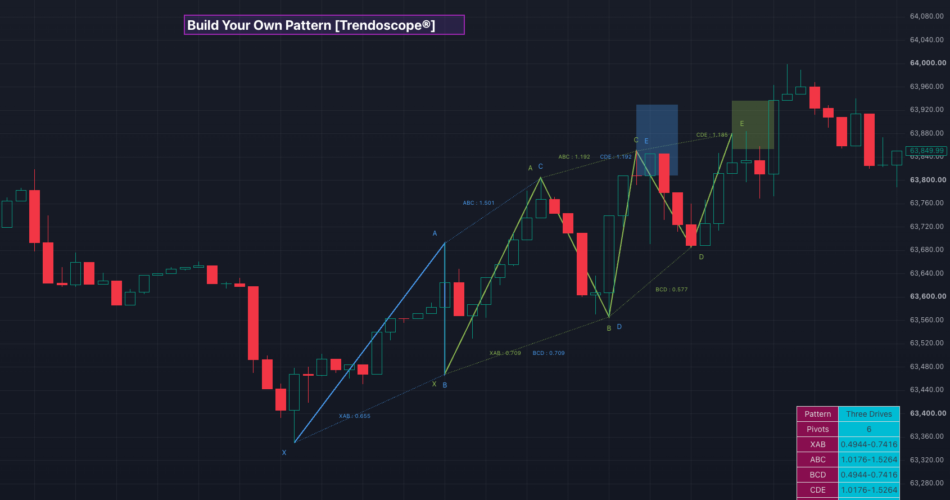
BYO Pattern V1 (Build Your Own Pattern) is a highly flexible open-source indicator that empowers traders to design, define, and automatically detect custom geometric patterns based on Fibonacci ratios between zigzag pivots.
Unlike traditional harmonic or chart pattern indicators that come with fixed, pre-defined rules, this tool puts the power of pattern creation entirely in your hands. You choose the number of pivots (5 or 6), enable the specific ratio conditions you care about, set exact values or ranges, and the indicator scans the chart in real time for matching structures.
Default configuration is set to the classic Three Drives pattern, but you can reconfigure it in seconds to detect almost any ratio-based pattern — including custom variations of ABCD, Gartley-style structures, Three Drives, 5-0, or completely original patterns of your own invention.
🎲 Core Concept
The indicator works on the principle that many powerful reversal and continuation patterns can be described as a sequence of alternating pivots (X-A-B-C-D or X-A-B-C-D-E) whose price legs satisfy specific Fibonacci retracement or extension relationships.
You define those relationships. The script does the heavy lifting:
- Builds a zigzag of the required depth
- Extracts the most recent 5 or 6 pivots
- Calculates the relevant Fibonacci ratios between those pivots
- Validates them against your enabled ratio rules (with optional tolerance)
- Draws the valid pattern with labels, ratio annotations, and a Potential Reversal Zone (PRZ)
This approach is especially useful for traders who want to:
- Test proprietary ratio combinations
- Adapt classical patterns to different markets or timeframes
- Explore less common structures that commercial indicators ignore
- Create rules-based patterns for systematic trading or research
🎲 Supported Pattern Structures
- 5-Pivot Patterns (X-A-B-C-D) – Classic XABCD-style and many harmonic variations.
- 6-Pivot Patterns (X-A-B-C-D-E) – Three Drives and more complex multi-leg structures.
🎲 Available Ratio Conditions
You can independently enable and configure the following ratios:
- XAB – Retracement of XA by AB
- ABC – Retracement of AB by BC
- BCD – Retracement of BC by CD
- CDE – Retracement of CD by DE (6 pivots only)
- XAD – Retracement of XA by AD
- XCD – Retracement of XC by CD
- ABE – Retracement of AB by BE (6 pivots only)
- ADE – Retracement of AD by DE (6 pivots only)
Each ratio can be set as:
- An exact value (the Error Percent setting expands it into a tolerance band)
- A range (Start Value → End Value)
At least one terminal ratio must be enabled depending on the pivot count (validation is enforced at runtime). For example,
- 5 pivot pattern should at least have one of the ratio enabled among BCD, XAD or XCD.
- 6 pivot pattern should at least have one of the ratio enabled among CDE, ABE and ADE
🎲 Key Features
- Fully Customizable Pattern Definition — Name, pivot count, and all ratio rules
- Error Tolerance — Built-in percentage tolerance for practical real-world matching
- Log Scale Support — Calculate ratios on logarithmic scale when needed
- Automatic Pattern Drawing – draws patterns with labelling of pivots and ratios
- Potential Reversal Zone (PRZ) — Automatically calculated and displayed as a shaded box based on the active terminal ratios
- Color Theme Support — Dark / Light theme with automatic color cycling so multiple patterns remain distinguishable
- Duplicate Filtering — Prevents redrawing identical pivot sets
- Summary Table — Live table showing pattern name, pivot count, active ratio ranges, and total patterns identified
- Real-time or Confirmed Bars — Option to include or exclude forming bars
🎲 How Detection Works
- A zigzag is calculated using the user-defined length.
- When a new pivot is confirmed (and enough pivots exist), the script extracts the latest 5 or 6 points.
- All relevant Fibonacci ratios are calculated.
- Each enabled ratio is validated against its defined range (or exact value ± error percent).
- If all enabled ratios pass validation and the pattern is not a duplicate of an already drawn one, it is accepted.
- The pattern is drawn with the next available theme color, labels, ratio annotations, and PRZ (if applicable).
🎲 Settings Guide
🎯 Zigzag Group
- Length — Controls the sensitivity of the underlying zigzag (higher = fewer, more significant pivots)
- Depth – Depth of zigzag level 1 to be considered for recursive zigzag calculation. Higher depth will result in more recursive levels and hence will scan higher number of patterns. However, this will also slow down the algorithm and can lead to runtime errors
- Use Real Time Bars — Include the current forming bar in calculations
🎯 Pattern Group
- Title — Custom name that appears in the summary table and can help you identify different configurations
- Number of Pivots — Choose 5 or 6
- Error Percent — Tolerance applied when a ratio is set as an exact value
- Log Scale — Use logarithmic price differences for ratio calculations
🎯 Ratios Group
- Individual enable toggles + Start/End value inputs for every supported ratio
- Only the ratios you enable are checked
- CBE, ABE, and ADE ratios are only available for 6 pivot patterns
🎯 Display Group
- Theme (Dark / Light)
- Show / Hide Pivot Labels
- Show / Hide Ratio Labels
- Show / Hide Summary Table
🎲 Example Use Cases
- Load the default Three Drives configuration and study how frequently it appears on your instruments
- Recreate a classical ABCD pattern by setting 5 pivots and enabling XAB + ABC + BCD with the classic ratios
- Design a proprietary 6-leg structure and backtest its appearance across multiple symbols
- Use tight error percentages for high-precision setups or wider ranges for more frequent signals
You can also try out some other simple harmonic patterns. There are lots of educational ideas published in tradingview about harmonic ratios. One such example is Advanced Harmonic Pattern Ratios by cmjohnson36
However, the real power of this indicator is that you can build your own set of ratio combinations and come up with new patterns.
🎲 Important Notes
- This is a detection and visualization tool. It does not generate buy/sell signals or manage trades.
- Pattern quality still depends on the quality of the underlying zigzag. Experiment with different Length values.
- For 6-pivot patterns, at least one of CDE / ABE / ADE must be enabled.
- For 5-pivot patterns, at least one of BCD / XAD / XCD must be enabled.
Your Patterns. Your Rules. Design it. Detect it. Trade it.
Source link
Author

- Ytv Market News
- Share-market news writer and analyst with deep experience covering equities, commodities, forex, and cryptocurrencies for readers in the USA, UK, Canada, and Australia. Ytv Market News delivers timely market updates, practical trading insights, and clear explanations of macro and company-level catalysts that move prices. Combines on-the-ground financial reporting with technical analysis, using concise charts and actionable ideas to help investors and traders make smarter decisions.
Latest entries
 Crypto NewsAugust 24, 2026Top 3 Price Prediction: Bitcoin, Ethereum, Ripple – BTC, ETH and XRP pause as momentum indicators signal overbought conditions, massive rallies
 CanadaAugust 24, 2026DENARIUS METALS ANNOUNCES CLOSING OF STRATEGIC INVESTMENT IN COPPER GIANT RESOURCES AND CONCURRENT PRIVATE PLACEMENT WITH TRAFIGURA
 Trading IndicatorsAugust 24, 2026Universal Signal Backtester | Trading Indicator
 Trading IndicatorsAugust 24, 2026Initial Balance Auction Intelligence by DGT — Indicator by dgtrd — TradingView