
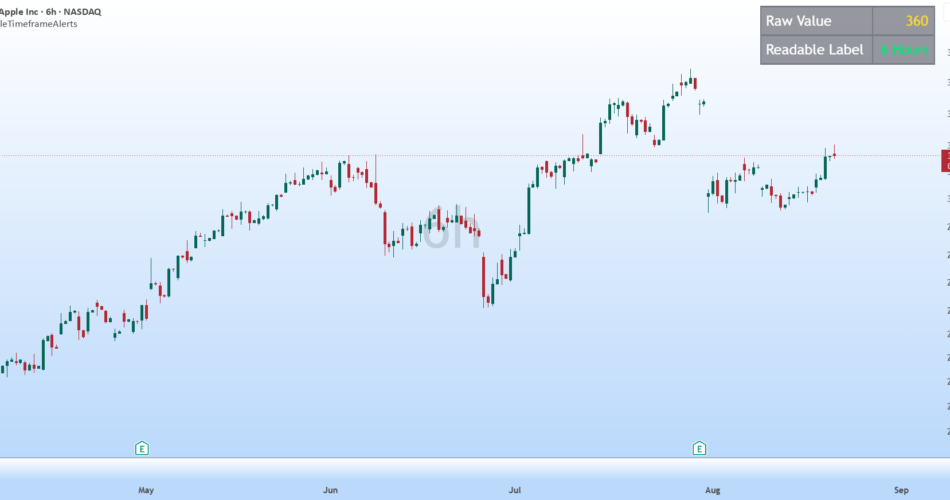
Pine’s timeframe.period gives you raw values like “60”, “240”, “1D”, “3M” — accurate, but not something a normal user can read at a glance. If your alert says “Zone formed on 360,” most people have no idea that 360 means the 6-hour timeframe.
This library converts that raw string into a proper readable label: “60” becomes “1 Hour”, “240” becomes “4 Hours”, “1D” becomes “Daily”, “3M” becomes “3 Months”, and so on — covering minutes, hours, days, weeks, months, seconds, and ticks.
I built this after running into the exact issue in my own — a user kept seeing numbers like 360 in their alerts and couldn’t tell what timeframe it referred to. This library is what fixed it, and I’m sharing it so anyone facing the same confusion can drop it into their own script.
Usage:
import AfnanTAjuddin/ReadableTimeframeAlerts/1 as tf
alert(“Zone formed on ” + tf.f_tf_label(timeframe.period))
One line, and your alert messages, labels, or tables show a timeframe users actually understand instead of a raw number.
Found an edge case it doesn’t handle correctly? Drop a comment and I’ll take a look.
Source link
Author

- Ytv Market News
- Share-market news writer and analyst with deep experience covering equities, commodities, forex, and cryptocurrencies for readers in the USA, UK, Canada, and Australia. Ytv Market News delivers timely market updates, practical trading insights, and clear explanations of macro and company-level catalysts that move prices. Combines on-the-ground financial reporting with technical analysis, using concise charts and actionable ideas to help investors and traders make smarter decisions.
Latest entries
 Investing InsightsAugust 24, 2026Daesang’s Cash Plunges 90% Ahead of $169 Million Antitrust Fine; $303 Million Drained by Debt Repayment and Investment — BigGo Finance
 GermanyAugust 24, 2026British firm offers to restart mothballed Australian manganese smelter
 Crypto NewsAugust 24, 2026Debasement trades lift Bitcoin amid long-term holder distributions
- CanadaAugust 24, 2026Canadian Investment Regulatory Organization Trade Resumption